Profile sharing
Ensure that you comply with our privacy terms.
Request and retrieve customer profile information (such as name, address, email, or phone number) securely during the payment process, with explicit user consent.
Profile sharing is used in various payment flows:
- Required for Express - customers must share name, address, phone, and email for shipping
- Optional for standard payments - request specific profile details as needed
User consent flow
When you request profile information, a consent screen is displayed in the user's Vipps or MobilePay app before the payment screen.
- Vipps
- MobilePay
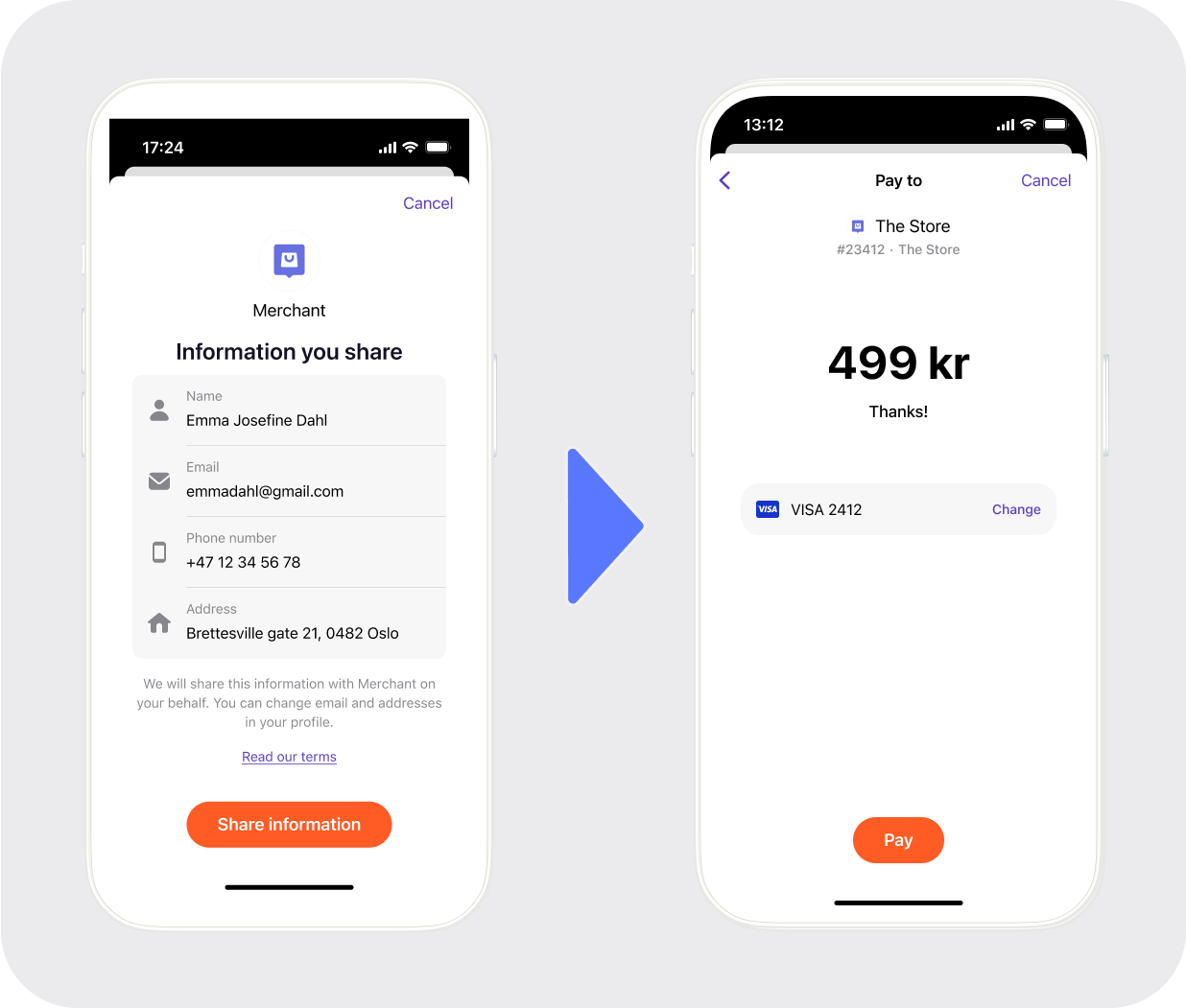
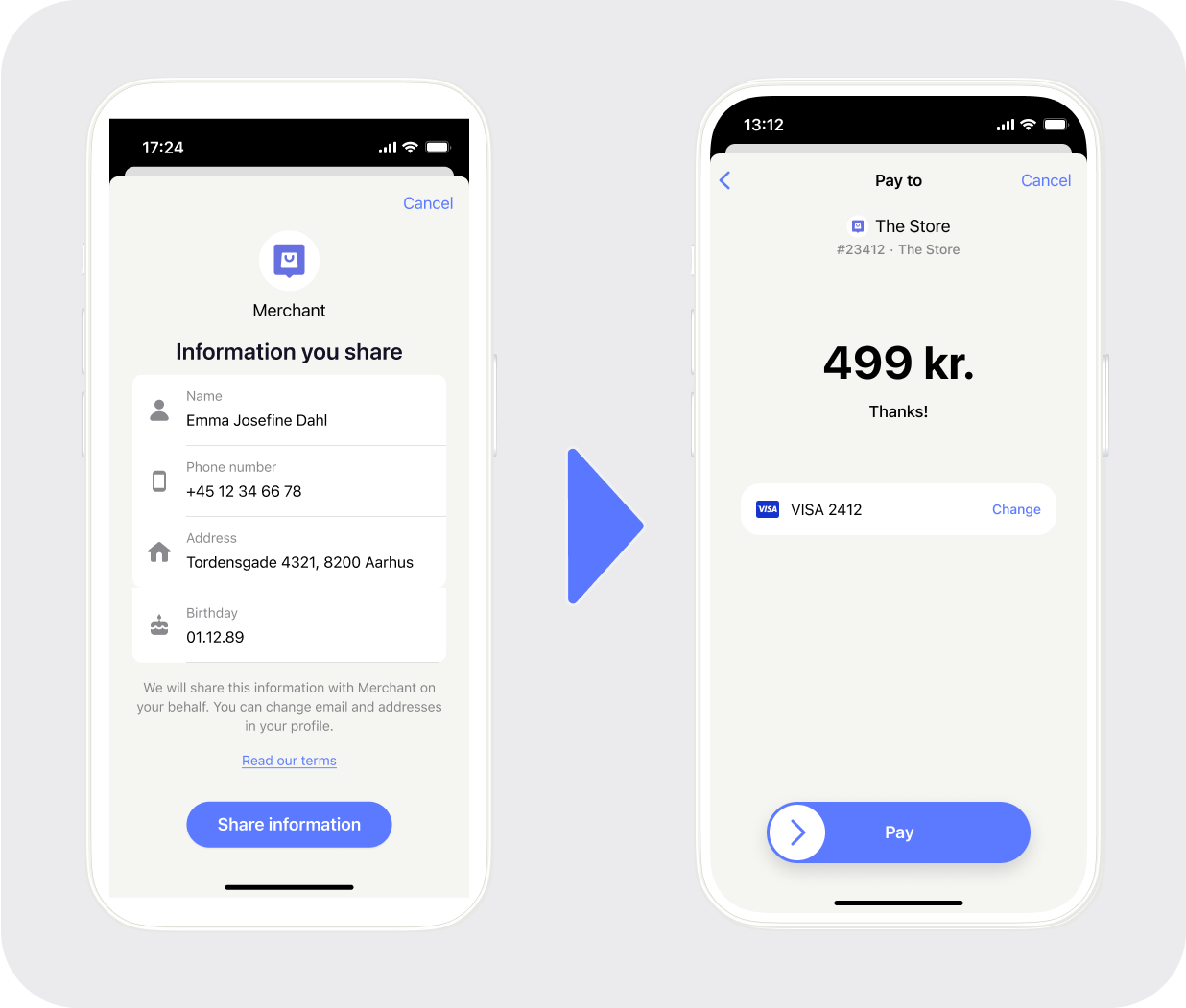
The user must complete both the consent screen and the payment screen before you get access to their profile information. If the user doesn't consent, the payment will fail.
Use as few scopes as possible to reduce the risk that the user cancels the payment.
Requesting profile information
To request access to user profile information, include the profile.scope property in your POST:/epayment/v1/payments request.
Available scope values
Specify which profile details you need by including them in profile.scope, separated by spaces:
address- User's registered address(es)birthDate- User's date of birthemail- User's email addressname- User's full name (first and last)phoneNumber- User's phone numbernin- National identity number (special cases only)
Example request
curl -X POST https://apitest.vipps.no/epayment/v1/payments \
-H "Content-Type: application/json" \
-H "Authorization: Bearer YOUR-ACCESS-TOKEN" \
-H "Ocp-Apim-Subscription-Key: YOUR-SUBSCRIPTION-KEY" \
-H "Merchant-Serial-Number: YOUR-MSN" \
-H "Idempotency-Key: YOUR-IDEMPOTENCY-KEY" \
-H "Vipps-System-Name: acme" \
-H "Vipps-System-Version: 3.1.2" \
-H "Vipps-System-Plugin-Name: acme-webshop" \
-H "Vipps-System-Plugin-Version: 4.5.6" \
-d '{
    "amount": {
        "value": 49900,
        "currency": "NOK"
    },
    "paymentMethod": {
        "type": "WALLET"
    },
    "customer": {
        "phoneNumber": 4712345678
    },
    "reference": UNIQUE-PAYMENT-REFERENCE,
    "userFlow": "WEB_REDIRECT",
    "returnUrl": "https://example.com/redirect?reference=UNIQUE-PAYMENT-REFERENCE",
    "paymentDescription": "Purchase of socks",
    "profile": {
        "scope": "name phoneNumber address birthDate"
    }
}'
See Userinfo API guide: scope for more details.
The user will see a consent screen in their app for any profile information they haven't previously shared with your sales unit. The consent must be accepted before they can complete the payment.
Consent validity
User consents remain valid for 7 days. Fetch the user's information as soon as consent is given to ensure data accuracy.
Retrieving profile data
After the payment is authorized, the profile data is available through the ePayment API or the Userinfo API.
Via the ePayment API
The ePayment API returns the user details you requested via scope. Retrieve them in one of two ways:
- Poll the payment: Call
GET:/epayment/v1/payments/{reference}after the payment is approved. - Webhook: If you have a registered webhook for
epayments.payment.authorized.v1, the profile data is included in the payload.
In the response, the userDetails object contains the profile information:
email- User's email addressfirstName- User's first namelastName- User's last namemobileNumber- User's phone numberdateOfBirth- User's date of birthaddresses- Array of user's addresses
Example:
{
    "userDetails": {
        "email": "test.user@example.com",
        "firstName": "Test",
        "lastName": "User",
        "mobileNumber": "4712345678",
        "dateOfBirth": "1955-05-18",
        "addresses": [
            {
                "addressLine1": "BOKS 6300, ETTERSTAD",
                "addressLine2": "",
                "city": "OSLO",
                "country": "NO",
                "postCode": "0603"
            },
            {
                "addressLine1": "Robert Levins gate 5",
                "addressLine2": "",
                "city": "Oslo",
                "country": "NO",
                "postCode": "0152"
            }
        ]
    },
    // ... other items here....
}
Via the Userinfo API
The Userinfo API provides access to even more information. To use this, you need the sub value for the payment.
The profile.sub in the ePayment response is a unique identifier for a Vipps MobilePay user, scoped to their consent with your sales unit. It is returned by both the GET:/epayment/v1/payments/{reference} and the webhook payload.
Example:
{
    "profile": {
        "sub": "126684df-c056-4625-821d-f2905febe3f9"
    }
}
Retrieve the user's profile information using the Userinfo API, as described in the Userinfo API guide.